Saturday, 2 June 2012

Power off USB hard disk by safely remove option.


By default in Windows 7 and Vista all usb devices remain in state of power on even after Safely Removed USB Device at the right bottom on task bar due to this When power is active state, the hdd plates are keep moving even after safely remove. so, if person unplugged his hdd from usb port then bad sector can occur due to power isstill on. This is not happen in windows XP.
To power down/off the usb device by Safely Removed option. see the registry entry in the following link or watch the above video.

http://support.microsoft.com/kb/2401954

Wednesday, 4 April 2012

Nirsoft Launcher all in one


This is very nice tool. You will find lots of pretty tools in one launcher. This tool have following utilities
  • Asterisk Logger Reveals the passwords stored behind the asterisks ('***') boxes 
  • BlueScreenView Show information about blue screen crashes occurred in your system. 
  • ChromeCacheView Chrome Browser Cache Viewer, here you will find youtube videos.
  • CurrPorts   Displays the list of all currently opened TCP/UDP ports on your computer. 
  • DriverView Displays the list of all device drivers currently loaded on your system. 
  • MozillaCacheView List all files currently stored in the cache of Firefox/Mozilla browser.
  • MyLastSearch View your latest searches with Google, Yahoo, and MSN 
  • NetworkTrafficView Displays network traffic statistics on your network adapter
  • SkypeLogView View log files created by Skype 
  • VideoCacheView Extract Web site video files from the cache. Example:- youtube, metcafe etc.
  • Much more see here
  Download

Hide secret messages into audio files.

If you have created a password text file and wants to safe it from other viewers. Then you can hide your text file in your favourite song.


Download

Monday, 2 April 2012

Reset Windows 7 password without third party tool.

Its nice trick to reset windows password. If you do not have any third party tool. On follwing OS you can apply this method
Windows 7
Windows Server 8
Windows Vista

You need Windows Installation Disc for this. Insert your Windows Installation disk into DVD Drive/CD rom. Change the Boot settings from BIOS.  1st boot device should be DVD or CD drive.

1. Choose "repair your computer" option.
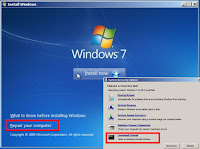
2. Command prompt option from bottom.

 3. By deafult , you will see X:\Sources>   this is your DVD drive.
Try to search Windows folder that will be  original C drive. See the image
go to C:\Windows\System32 and type following commands
ren utilman.exe utilman.exe.bak
ren cmd.exe utilman.exe
restart pc.
See the commands here in image

After this restart you pc. then go to login prompt. Then click on "Ease of Access" Button below at left side. or press windows key + U key together. command prompt will open then type the following command to set the password
net user administrator *  or net user administrator newpassword
to see the all users on computer then type only net user.

Finished.


Tuesday, 27 March 2012

Reset Linux root Password

All we need is a LiveCD Linux system

In some linux systems the username/password database is located at "/etc/passwd"
If you have any other linux system just search on google where the username/password file is located.

I am here telling Backtrack 5
Password is located at "/etc/shadow" but its encrypted. To make the change we need to mount first the partition where our linux system is located. go to that location /etc/shadow
edit it via nano editor
nano /etc/shadow then you will see something like this root:xxxxxxxxx:15098:0:99999:7:::
here above instead of xxxxxxxxxxx you will see other symbols when you will open that file in your pc. Just remove all the xxxxxxxxxxxx(symbols) next to root
example :-
Before : -  root:xxxxxxxxx:15098:0:99999:7:::
After :-    root::15098:0:99999:7:::
Save the file and reboot the system and you will find blank password of root.

Thursday, 2 February 2012

Windows Security Log Events

Windows Security Log Events in event viewer

http://www.ultimatewindowssecurity.com/securitylog/encyclopedia/Default.aspx